
Your domain is your address on the internet. You rent it yearly, and as long as you keep paying, nobody can take it.
Do this first, and pay for it yourself. Of everything involved in your site, the domain is the piece that matters most to own outright. It is your name. If it is registered to me or to an agency, the day you want to leave becomes a negotiation. Registered to you, it never is.
Why Cloudflare? They sell domains at cost and do not raise the price at renewal. The others sell a cheap first year and quietly triple it. Cloudflare also runs the speed and security layer your site sits behind, so it is one account instead of two.
Time: 15 minutes.
Step 1 — Sign up
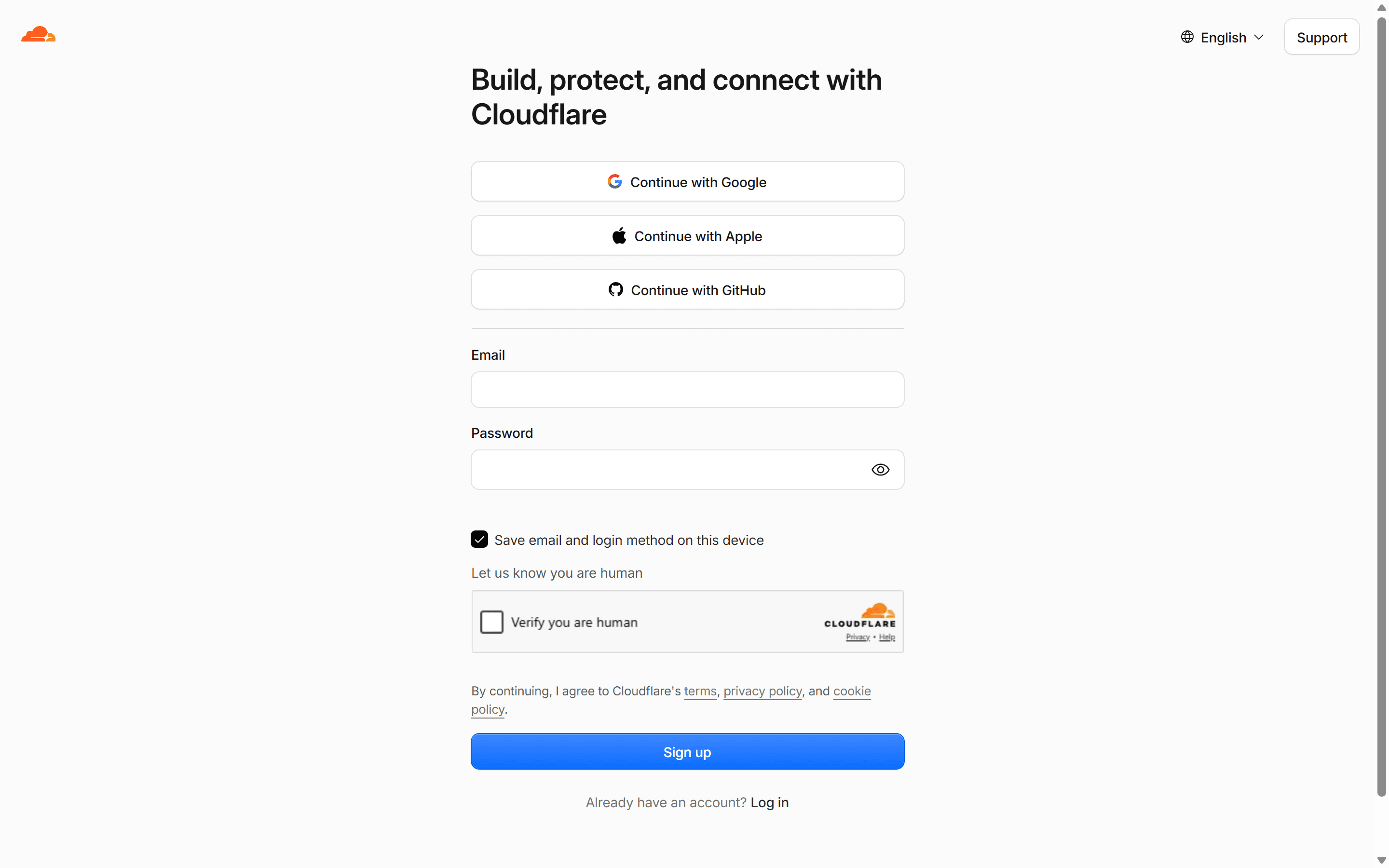
Go to cloudflare.com and click Sign Up. Enter your business email and a password, tick Verify you are human, then click Sign up and confirm the email they send. There are Google, Apple and GitHub buttons above the form if you would rather not make another password.
Your email, your account, your card. This is the one I most want in your name.
Step 2 — Buy the domain
Already own a domain? Skip this step and message me instead — there is a section on it further down. Do not buy a second one.
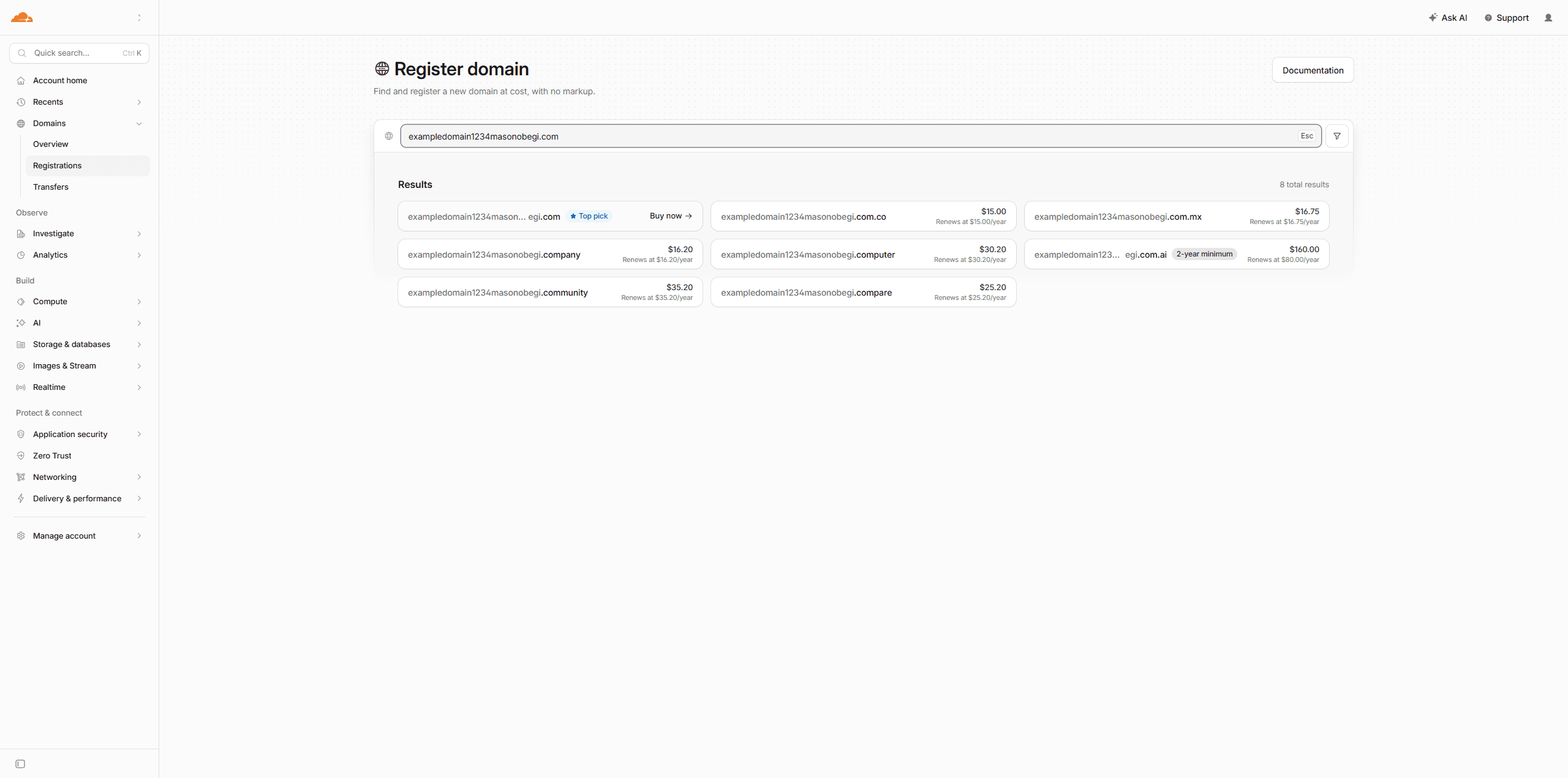
- In the left menu, click Domains, then Registrations.
- Type the name you want into the search box.
- Cloudflare lists what is available and the price. Under each one it also prints what it renews at — the same number. That is the whole point of buying here.
Picking a name:
- .com if you can get it. People type it by reflex.
- Short. It has to survive being read aloud over the phone.
- No hyphens or clever spellings. joes-plumbing.com and joezplumbing.com both end up at a competitor when somebody guesses.
- One name. You do not need five variations.
Add to cart, pay, done.
Check auto-renew is on. It should already be on — confirm it rather than taking my word for it. A lapsed domain is the one mistake here that is genuinely hard to undo: the moment it expires, anyone can buy it.
Step 3 — Add me to your account
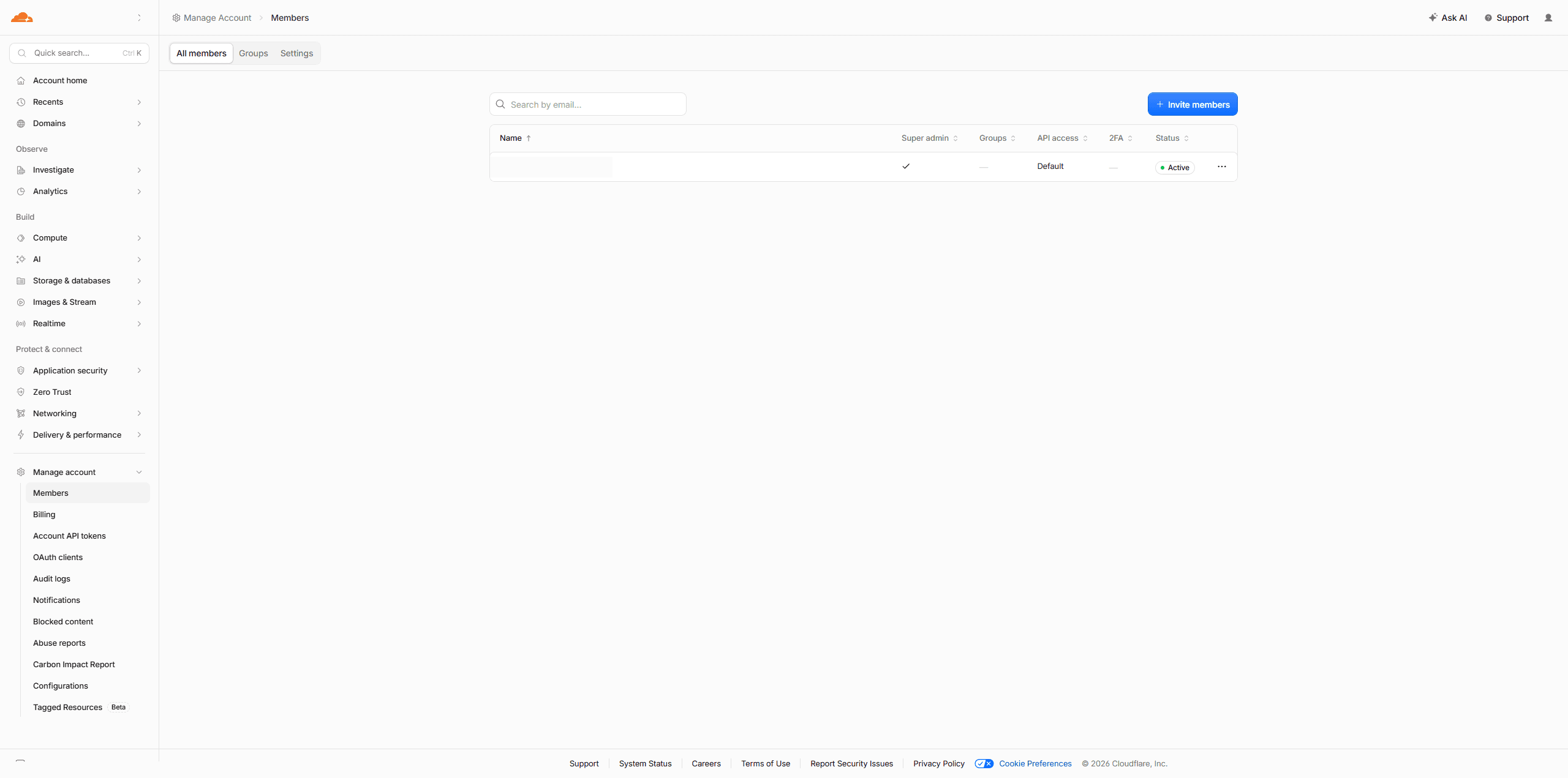
- In the left menu, click Manage account, then Members.
- Click Invite members.
- Enter [email protected]
- Switch "Super Administrator – All Privileges" off. Cloudflare switches it on for you.
- Switch Administrator on instead.
- Click Create policy.
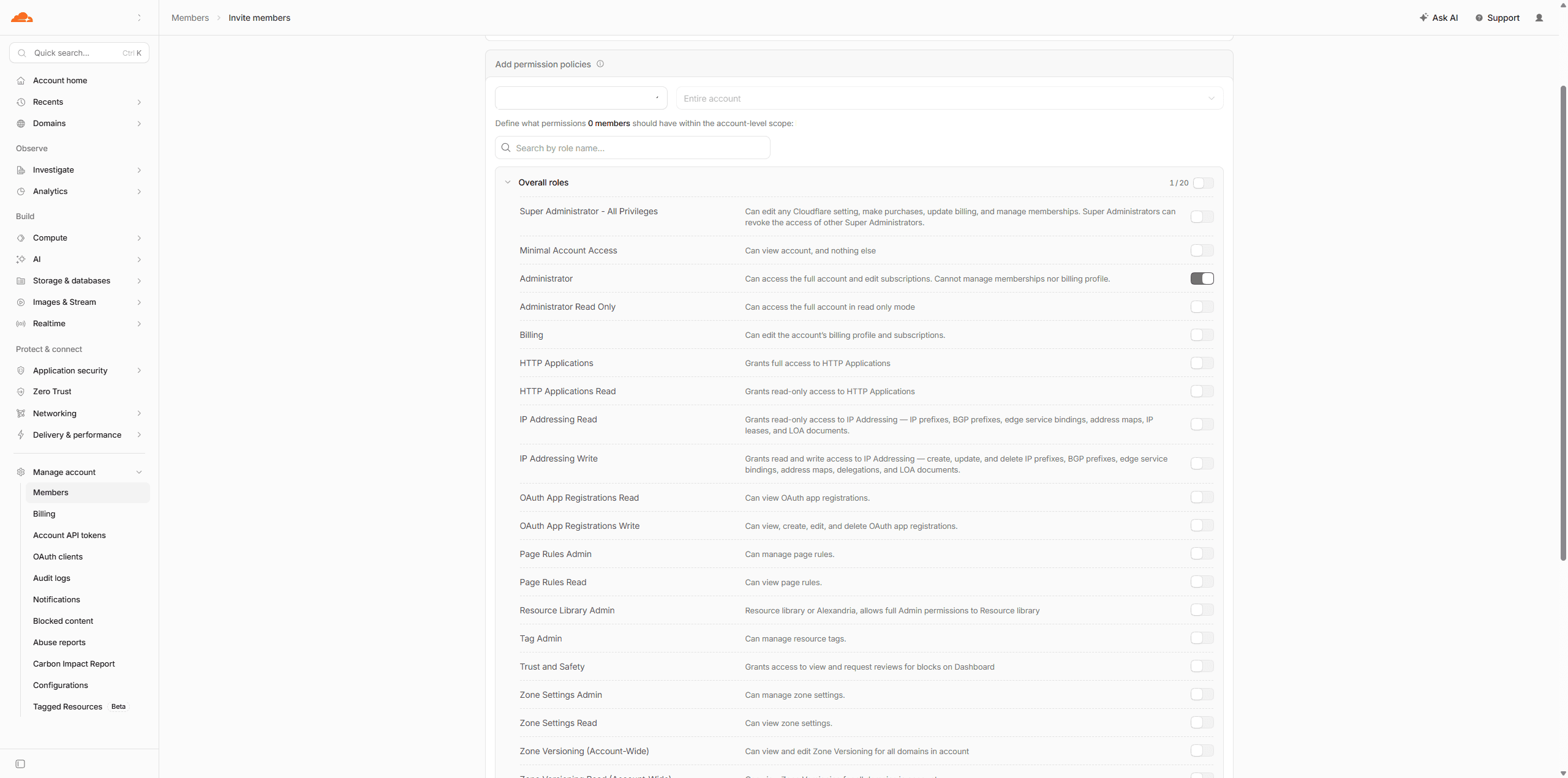
- Check the Roles column now reads Administrator, not Super Administrator.
- Click Invite members.
Step 4 is the one that matters. Cloudflare's own wording for Super Administrator: it "can edit any Cloudflare setting, make purchases, update billing, and manage memberships." Leave it switched on and you have given me far more than the job needs.
This lets me point your domain at your site, set up your email records, and turn on the caching that makes it fast — without a call where I read DNS records to you over the phone.
It does not transfer ownership. You stay the registrant. Administrator cannot manage memberships or your billing profile — so I cannot remove you, and you can remove me in two clicks with everything still working, because it is yours.
Want it tighter than Administrator? Say so and I will tell you the exact toggles. The list is long and it is easier if I read it than if you guess.
Would rather not add me? Genuinely fine. Send screenshots of the DNS screen and we will do it the slow way.
Already own a domain elsewhere?
Stop here and message me before you do anything — [email protected] or (360) 921-0148. Tell me the domain and who you bought it from. That is all I need.
Do not buy a new one. You already have the part that matters, and a second domain is a second bill and a second thing to keep track of.
There are two ways to go, and which one is less hassle depends on where your domain is now — which is why it is worth one message rather than a guess:
- Move it to Cloudflare. Usually cheaper, and everything ends up in one place. Takes about a week, almost all of it waiting.
- Leave it where it is and point it here. Works fine, nothing to wait for, but it means two logins and two bills.
Some registrars also lock a domain for 60 days after you buy or transfer it, so the timing matters. Tell me where it is and I will give you a straight answer on which to do — and then do it.
Common snags
"The name is taken." Add your city or trade. camasplumbing.com beats joesplumbing2.com, and it helps you show up in local searches.
"WHOIS privacy?" Cloudflare includes it free, and it should already be on — check that it is, rather than assuming. Without it, your home address and phone go in a public database that spammers scrape.
"How much?" Most .com names run about $10–12 a year at cost. Cloudflare shows the exact price before you pay, and it will not change at renewal.
"Do I need a paid plan?" No. Free is genuinely enough.
You are done
That is your domain bought and Cloudflare set up. You own the name.
If we are working together, message me once the invite is out — [email protected] or (360) 921-0148. I will point the domain at your site and set up the records your email needs.
Next: the Resend guide, which needs this one finished first.
Why Cloudflare, and not GoDaddy or Namecheap
Skip this. It changes nothing about what you need to do.
GoDaddy is the one most people have heard of, and the one I would steer you away from hardest. The advertised first-year price is not the renewal price, privacy costs extra, and the checkout is a wall of upsells for things you do not need. None of that is a scam — it is just a business model where the domain is the hook.
Namecheap is genuinely fine. Fair prices, decent support. The only thing against it is that your domain sits in one account and your site's speed and security layer in another, so there are two places to log into and two bills.
Squarespace, Wix or GoDaddy's builder will sell you a domain as part of a bundle. Convenient, and it ties your name to their platform — which is exactly the position you do not want to be in the day you want to move.
What Cloudflare gives you here: domains sold at cost, with no markup and no renewal jump. Privacy included rather than upsold. And your domain, DNS, SSL certificate and the caching that makes your site fast all in one account — which means one login, one bill, and fewer places for something to break.
The trade-off, honestly: Cloudflare is built for people who work on websites, so parts of the dashboard assume knowledge you do not have. You should not need to touch any of it. That is what adding me is for.
Stuck? [email protected] or (360) 921-0148.
Domain bought? Go on to the Resend guide next.
Comments